Applies to SQL Server 2019, 2022 and 2025.
The STRING_ESCAPE function takes a piece of text and escapes the characters that would break it inside a JSON string: quotes, backslashes, forward slashes and control characters such as tabs and line breaks. It’s useful when you build JSON by hand, and easy to misuse when you don’t need to.
What the STRING_ESCAPE function does
The syntax is STRING_ESCAPE(text, type). The only type SQL Server supports is 'json', so in practice it’s a JSON escaper. It returns nvarchar(max).
It escapes these characters:
- Double quote becomes
\", backslash becomes\\and forward slash becomes\/. - Backspace, form feed, new line, carriage return and tab become
\b,\f,\n,\rand\t. - Any other control character, CHAR(0) to CHAR(31), becomes
\u0000style.
Single quotes aren’t touched. They mean nothing special in JSON, and STRING_ESCAPE has nothing to do with T-SQL string literals.
A worked example
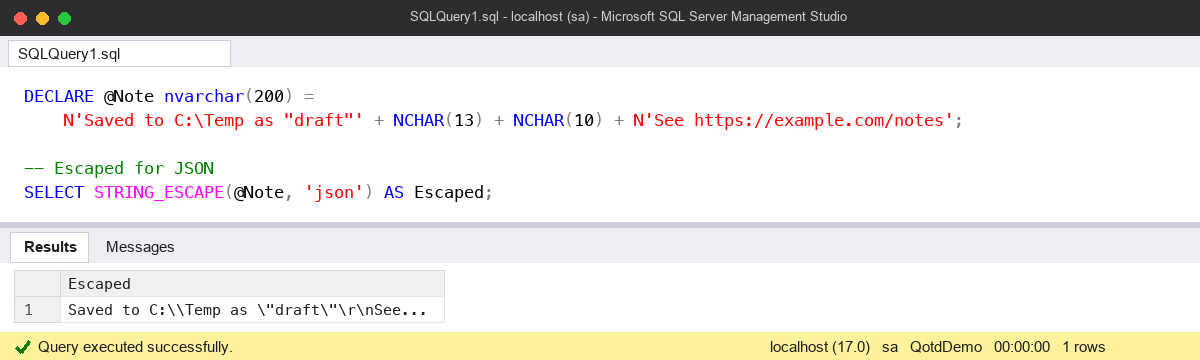
DECLARE @Note nvarchar(200) =
    N'Saved to C:\Temp as "draft"' + NCHAR(13) + NCHAR(10) + N'See https://example.com/notes';

-- Escaped for JSON
SELECT STRING_ESCAPE(@Note, 'json') AS Escaped;
-- Saved to C:\\Temp as \"draft\"\r\nSee https:\/\/example.com\/notes

-- Building a small JSON document by hand
DECLARE @Json nvarchar(max) =
    N'{"id":42,"note":"' + STRING_ESCAPE(@Note, 'json') + N'"}';

SELECT @Json                           AS JsonText,
       ISJSON(@Json)                   AS IsValid,      -- 1
       JSON_VALUE(@Json, '$.note')     AS NoteBack;     -- the original text

-- Without escaping, the quotes end the string early
SELECT ISJSON(N'{"id":42,"note":"' + @Note + N'"}') AS IsValidUnescaped;  -- 0
JSON_VALUE reads the escaped text back as the original note, with the real quotes and line break. That round trip is a quick check that you’ve escaped once, not twice or not at all.
The common mistake: escaping twice
If you’re producing JSON with FOR JSON, you don’t need STRING_ESCAPE at all. FOR JSON escapes string values itself. Adding STRING_ESCAPE on top escapes the escapes:
DECLARE @Path nvarchar(100) = N'C:\Temp\"draft"';

-- Right: let FOR JSON do it
SELECT @Path AS FilePath
FOR JSON PATH, WITHOUT_ARRAY_WRAPPER;
-- {"FilePath":"C:\\Temp\\\"draft\""}

-- Wrong: escaped twice
SELECT STRING_ESCAPE(@Path, 'json') AS FilePath
FOR JSON PATH, WITHOUT_ARRAY_WRAPPER;
-- every backslash is doubled again, and the consumer gets the
-- escaped text back instead of the original path
The JSON is still valid, which is why this one slips through. Nothing fails: the application just shows C:\\Temp\\\"draft\" to the user, and someone adds a REPLACE in the front end to undo it.
The other mistake I see is reaching for STRING_ESCAPE to protect dynamic SQL. It does nothing for single quotes, so it gives no protection at all against injection. Pass values as parameters with sp_executesql, and use QUOTENAME for object names.
Watch out for
- NULL in, NULL out. Concatenating a NULL result with + makes the whole JSON string NULL. Wrap it in ISNULL, or use CONCAT, if the value can be missing.
- Only ‘json’. Any other type value raises an error. It isn’t an HTML or XML escaper.
- Forward slashes.
\/is valid JSON, but some people compare the output with what another tool produced and think it’s wrong. It isn’t: JSON readers treat\/and/the same. - Escape values, not names. If a key name could contain odd characters, escape that too, or better, let FOR JSON build the document.
Where it fits
I use STRING_ESCAPE when I’m assembling a small JSON payload by hand, for example in a logging procedure or a webhook call, and FOR JSON everywhere else. For other string work, my SQL Server regex functions post and the SQL Server DBA Handbook cover more of the toolkit.
Microsoft’s reference page for STRING_ESCAPE (Transact-SQL) lists every character it escapes.
This topic came up in the SQLServerCentral Question of the Day: Escaping Strings.
Clive Roberts DBA