Applies to SQL Server 2019, 2022 and 2025.
Every instance has a SQL Server service name, and @@SERVICENAME is the quick way to ask an instance what its name is from T-SQL. It’s a small function, but I use it in scripts that need to work the same way on default and named instances, and it has one trap that catches people out.
What @@SERVICENAME returns for the SQL Server service name
@@SERVICENAME takes no arguments and returns an nvarchar value. On a default instance it returns MSSQLSERVER. On a named instance it returns the instance name only: connect to SQLPROD02\FINANCE and you get FINANCE.
That’s the part people misremember. The Windows service for that named instance is called MSSQL$FINANCE, and its Agent is SQLAgent$FINANCE, but @@SERVICENAME doesn’t give you the prefix. You have to add it yourself.
A worked example
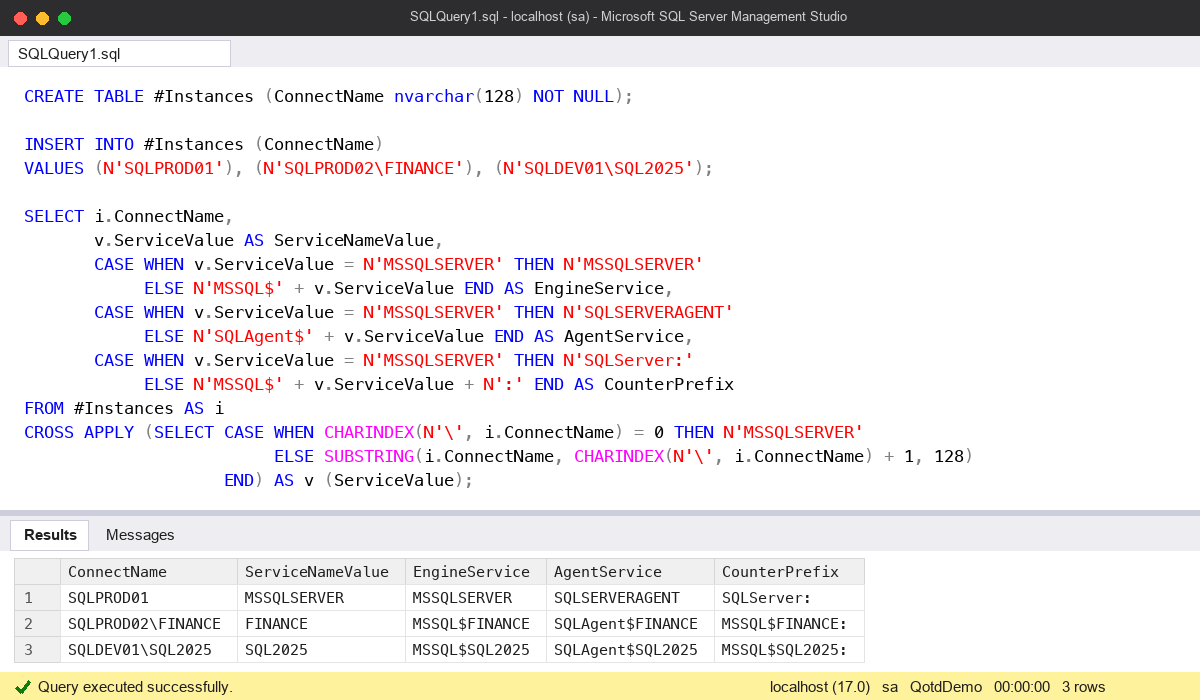
Here I’ve put three connection names in a temp table and worked out, for each one, what @@SERVICENAME would return on that instance and the names you’d build from it: the engine service, the Agent service and the performance counter prefix.
CREATE TABLE #Instances (ConnectName nvarchar(128) NOT NULL);

INSERT INTO #Instances (ConnectName)
VALUES (N'SQLPROD01'), (N'SQLPROD02\FINANCE'), (N'SQLDEV01\SQL2025');

SELECT i.ConnectName,
       v.ServiceValue AS ServiceNameValue,
       CASE WHEN v.ServiceValue = N'MSSQLSERVER' THEN N'MSSQLSERVER'
            ELSE N'MSSQL$' + v.ServiceValue END AS EngineService,
       CASE WHEN v.ServiceValue = N'MSSQLSERVER' THEN N'SQLSERVERAGENT'
            ELSE N'SQLAgent$' + v.ServiceValue END AS AgentService,
       CASE WHEN v.ServiceValue = N'MSSQLSERVER' THEN N'SQLServer:'
            ELSE N'MSSQL$' + v.ServiceValue + N':' END AS CounterPrefix
FROM #Instances AS i
CROSS APPLY (SELECT CASE WHEN CHARINDEX(N'\', i.ConnectName) = 0 THEN N'MSSQLSERVER'
                         ELSE SUBSTRING(i.ConnectName, CHARINDEX(N'\', i.ConnectName) + 1, 128)
                    END) AS v (ServiceValue);
The default instance SQLPROD01 comes back as MSSQLSERVER, SQLSERVERAGENT and SQLServer:. The two named instances come back as MSSQL$FINANCE, SQLAgent$FINANCE and MSSQL$FINANCE:, and the same pattern for SQL2025.
On a live instance you don’t need the table. This compares @@SERVICENAME with the other name functions, then uses it to pick the right counter prefix:
SELECT @@SERVICENAME                  AS ServiceNameValue,
       @@SERVERNAME                   AS ServerNameValue,
       SERVERPROPERTY('InstanceName') AS InstanceNameProperty,
       SERVERPROPERTY('MachineName')  AS MachineNameProperty;

DECLARE @Prefix nvarchar(140) =
    CASE WHEN @@SERVICENAME = N'MSSQLSERVER' THEN N'SQLServer:'
         ELSE N'MSSQL$' + @@SERVICENAME + N':' END;

SELECT TOP (5) RTRIM(object_name) AS ObjectName, RTRIM(counter_name) AS CounterName, cntr_value
FROM sys.dm_os_performance_counters
WHERE object_name LIKE @Prefix + N'%';
I mostly use the counter prefix trick: sys.dm_os_performance_counters names its objects SQLServer:Buffer Manager on a default instance but MSSQL$FINANCE:Buffer Manager on a named one, so a hard-coded filter returns nothing on half your estate. My performance counter script does exactly this.
The common mistake
The mistake is treating @@SERVICENAME as the Windows service name. On a default instance the two happen to match, so a script written and tested there looks fine. Run it on a named instance and net stop FINANCE or a lookup for a service called FINANCE fails, because the real service is MSSQL$FINANCE.
The second slip is mixing it up with SERVERPROPERTY('InstanceName'). They agree on a named instance, but on a default instance InstanceName returns NULL while @@SERVICENAME returns MSSQLSERVER. If you concatenate the property into a string without handling NULL, the whole string becomes NULL.
When you need the exact Windows service names, and their accounts and status, ask sys.dm_server_services instead of building them. The names above are the standard pattern, which is fine for counters and scripts, but the DMV tells you what’s really installed.
Watch out for
- SQL Server on Linux and containers. There’s only the default instance, so
@@SERVICENAMEreturnsMSSQLSERVER. - @@SERVERNAME is not the same thing. It returns
SERVER\INSTANCEand can be out of date after a Windows rename until you fix it withsp_dropserverandsp_addserver.@@SERVICENAMEdoesn’t depend on that. - Padded counter names.
object_nameandcounter_namein the counters DMV are fixed-widthnchar, so trim them before comparing with=. - Service names on the command line. When you stop or start a named instance from the command line, use
MSSQL$NAME, as in my post on starting SQL Server with minimal configuration.
Microsoft’s reference page is here: @@SERVICENAME (Transact-SQL). For more day-to-day DBA scripts, see my SQL Server DBA Handbook.
This topic came up in the SQLServerCentral Question of the Day: The Service Name.
Clive Roberts DBA