Applies to SQL Server 2019, 2022 and 2025.
Every SQL Server certificate has an expiry date, whether or not you gave it one. What surprises people is how little SQL Server certificate expiry actually matters for most of what certificates do inside the database engine, and how much it matters for the one or two things where it is enforced. I check expiry dates as part of my regular estate checks, but I don’t panic when one has passed.
What a certificate is in SQL Server
A certificate is a database-level securable that wraps a public and private key pair. Inside SQL Server they’re used for a handful of jobs: protecting the TDE database encryption key, encrypting backups, signing stored procedures so they can run with extra permissions, encrypting data with ENCRYPTBYCERT, and authenticating Service Broker and database mirroring or availability group endpoints.
Certificates live in a database, so sys.certificates only shows the ones in the current database. The ones that protect TDE and backup encryption live in master.
How SQL Server certificate expiry is set
CREATE CERTIFICATE takes an optional START_DATE and EXPIRY_DATE, both in UTC. If you leave out START_DATE it’s set to now; if you leave out EXPIRY_DATE it’s set to one year after the start date. That default catches a lot of people out, because most scripts on the internet don’t set it.
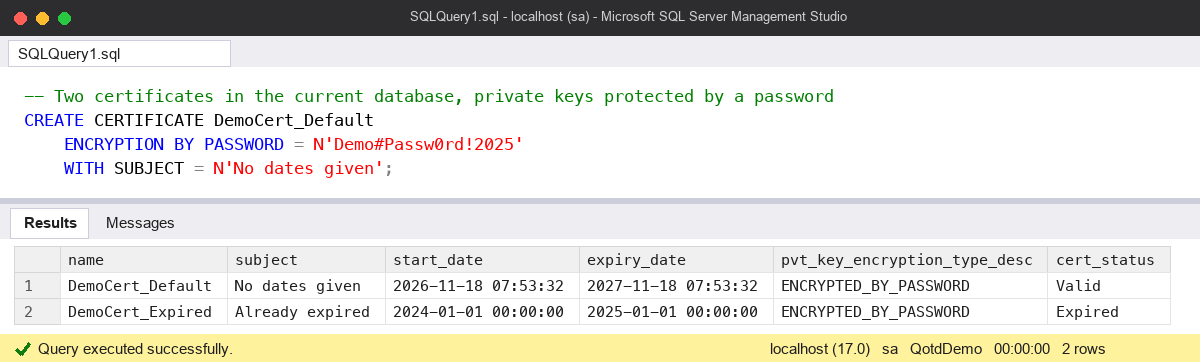
This creates two certificates, one with no dates and one that has already expired, then lists them:
-- Two certificates in the current database, private keys protected by a password
CREATE CERTIFICATE DemoCert_Default
    ENCRYPTION BY PASSWORD = N'Demo#Passw0rd!2025'
    WITH SUBJECT = N'No dates given';

CREATE CERTIFICATE DemoCert_Expired
    ENCRYPTION BY PASSWORD = N'Demo#Passw0rd!2025'
    WITH SUBJECT = N'Already expired',
         START_DATE = '20240101',
         EXPIRY_DATE = '20250101';

SELECT name,
       subject,
       start_date,
       expiry_date,
       pvt_key_encryption_type_desc,
       CASE WHEN expiry_date < GETUTCDATE() THEN 'Expired' ELSE 'Valid' END AS cert_status
FROM sys.certificates
WHERE name LIKE N'DemoCert%'
ORDER BY name;
The first certificate’s expiry date is exactly a year after its start date. SQL Server is happy to create the second one even though its expiry date is already in the past.
Where expiry is enforced, and where it isn’t
This is the part worth remembering:
- Service Broker checks the expiry date, so an expired certificate breaks dialog security and remote routing.
- Backup encryption checks it too: you can’t take a new encrypted backup with an expired certificate, but you can still restore one.
- TDE doesn’t enforce it. An expired TDE certificate keeps the database encrypted and readable, and the database still restores elsewhere if you have the certificate and private key.
- Always Encrypted doesn’t enforce it either.
- The built-in encryption and signing functions (
ENCRYPTBYCERT,DECRYPTBYCERT,SIGNBYCERTand friends) don’t check it. If you care, your code has to.
You can prove the last point with the expired certificate from above:
DECLARE @secret varbinary(8000) =
    ENCRYPTBYCERT(CERT_ID(N'DemoCert_Expired'), N'Still works');

SELECT CAST(DECRYPTBYCERT(CERT_ID(N'DemoCert_Expired'), @secret,
            N'Demo#Passw0rd!2025') AS nvarchar(100)) AS decrypted_text;
It returns “Still works”. No error, no warning.
The common mistake
The mistake goes both ways. Some people assume an expired TDE certificate will take a database offline, so they rush an unplanned rotation late at night. It won’t, and rotating it badly (without backing up the new certificate) is far more dangerous than leaving it alone. Others assume expiry never matters, then find their encrypted backup jobs failing the morning after the certificate’s first birthday, because it was created with the one-year default.
The fix is the same in both cases: know which certificates you have, what they’re used for and when they expire. I run this on each instance:
SELECT name,
       subject,
       expiry_date,
       pvt_key_last_backup_date,
       DATEDIFF(DAY, GETUTCDATE(), expiry_date) AS days_left
FROM master.sys.certificates
WHERE name NOT LIKE N'##%'
ORDER BY expiry_date;
The ## filter hides the certificates SQL Server creates for itself. A NULL in pvt_key_last_backup_date means the private key has never been backed up, which is the bigger problem of the two. TDE: Backing Up the Certificate covers that.
Watch out for
- The one-year default
EXPIRY_DATE. Set it explicitly when you create a certificate for backup encryption or Service Broker. - Dates are UTC, so a certificate can expire a few hours earlier or later than you’d expect from local time.
- You can’t change a certificate’s expiry date with
ALTER CERTIFICATE. To extend it you create a new certificate and switch over to it (for TDE,ALTER DATABASE ENCRYPTION KEY ENCRYPTION BY SERVER CERTIFICATE). - Back up every new certificate and its private key straight away, and keep the file password somewhere other than next to the file.
- Certificates for endpoints (mirroring and availability groups) need checking on every replica, not just the primary.
The full list of options is on Microsoft Learn: CREATE CERTIFICATE (Transact-SQL). More of my day-to-day checks are in the SQL Server DBA Handbook.
This topic came up in the SQLServerCentral Question of the Day: SQL Server Certificates.
Clive Roberts DBA