Applies to SQL Server 2019, 2022 and 2025.
The T-SQL FORMAT function turns a number or date into a string laid out the way a particular country expects. I mostly use it for one job: showing money with the right currency symbol, thousands separator and decimal mark in a report or an email, without writing my own string handling.
How the T-SQL FORMAT function works
FORMAT takes three arguments: the value, a .NET format string, and an optional culture name such as 'en-GB' or 'de-DE'. It always returns nvarchar. For money, the format string you want is 'C' (currency). 'C' on its own gives two decimal places; 'C0' gives none, 'C3' gives three, and so on.
The culture decides the symbol, where it goes, and which characters separate the thousands and the decimals. FORMAT doesn’t convert between currencies. It just shows the same number the way that culture would write it.
A working example of formatting money
CREATE TABLE #Price
(
    Item  varchar(20) NOT NULL,
    Price money       NOT NULL
);

INSERT #Price (Item, Price)
VALUES ('Licence', 1234.50),
       ('Support', 99.99),
       ('Training', 25000.00);

SELECT Item,
       Price,
       FORMAT(Price, 'C', 'en-GB') AS UkPrice,
       FORMAT(Price, 'C', 'en-US') AS UsPrice,
       FORMAT(Price, 'C', 'de-DE') AS GermanPrice,
       FORMAT(Price, 'N2', 'en-GB') AS PlainNumber
FROM #Price
ORDER BY Price;

DROP TABLE #Price;
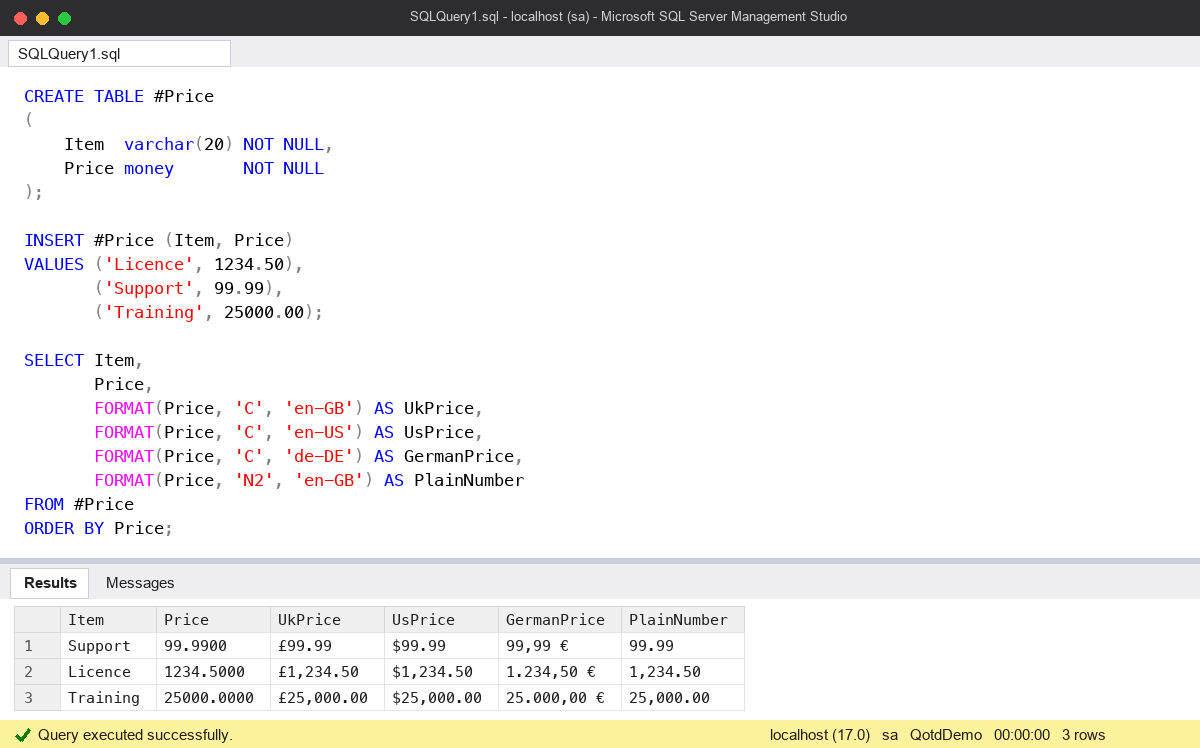
For the licence row you get £1,234.50, $1,234.50 and 1.234,50 €. The German version swaps the comma and the full stop and puts the euro sign after the number. 'N2' gives the separators and two decimals with no symbol at all, which is what I use when the currency is already in the column heading.
What happens if you leave the culture out
The culture is optional, and if you don’t pass one FORMAT uses the language of the current session. On a server where logins default to us_english you get dollars, whatever currency the data is really in:
SET LANGUAGE us_english;
SELECT FORMAT(CAST(1234.5 AS money), 'C') AS NoCulture;   -- $1,234.50

SET LANGUAGE British;
SELECT FORMAT(CAST(1234.5 AS money), 'C') AS NoCulture;   -- £1,234.50
Same query, same data, different output depending on who runs it. I always pass the culture explicitly for money.
The common mistake: formatting too early
The mistake I see most is treating the formatted value as if it were still a number. FORMAT returns text, so once you’ve formatted a column, sorting, comparing and adding all work on strings. Sort by the formatted column and the order goes wrong:
CREATE TABLE #P (Item varchar(10), Price money);
INSERT #P VALUES ('A', 9.99), ('B', 100), ('C', 25.5);

SELECT Item, FORMAT(Price, 'C', 'en-GB') AS PriceText
FROM #P
ORDER BY PriceText;   -- £100.00, £25.50, £9.99: sorted as text

DROP TABLE #P;
The fix is to keep the real money or decimal column for every calculation, filter and ORDER BY, and only format in the final SELECT. Better still, leave formatting to the report or application if it can do it, because that’s where the reader’s locale is actually known. Never store the formatted string in a table.
The second mistake is using FORMAT on big result sets. It runs through the .NET CLR once per row, and it’s much slower than CONVERT. If all you need is commas and two decimals in English style, CONVERT(varchar(30), Price, 1) on a money value gives 1,234,567.50 and is far cheaper.
Watch out for
- An invalid format string doesn’t raise an error. FORMAT just returns NULL, so a typo can quietly blank a column.
- Some cultures use characters you might not expect. French (
'fr-FR') separates thousands with a non-breaking space (NCHAR(160)), which can trip up anything that later tries to parse the string. 'C'rounds to the culture’s usual number of decimals. Japanese yen ('ja-JP') shows no decimals, so 1234.50 comes out as¥1,235.- Negative amounts are shown the way the culture shows them, which may be a leading minus or brackets. Test with a negative value before a finance report goes out.
- The result is
nvarchar. Assigning it to a shortvarcharcolumn or variable can truncate it or lose the currency symbol.
Microsoft’s reference page for FORMAT (Transact-SQL) lists the arguments and links to the .NET format strings. If you’re working out which numeric type to hold money in, my post on the T-SQL AVG function covers how money and decimal behave in aggregates, and there’s more in the SQL Server DBA Handbook.
This topic came up in the SQLServerCentral Question of the Day: Displaying Money.
Clive Roberts DBA