Applies to SQL Server 2019, 2022 and 2025.
Sooner or later every DBA gets asked to find special characters in a column: the stray tab that breaks an export, the apostrophe that upsets a downstream system, or the “space” that isn’t really a space. On SQL Server 2019 and 2022 the tool for the job is PATINDEX with a negated character class, and it still works perfectly well on 2025. It’s quick to write, but there’s one trap in it that catches nearly everyone, and it’s all down to collation.
How to find special characters with PATINDEX
PATINDEX takes a LIKE-style pattern and a string, and returns the position of the first match, or 0 if there isn’t one. The useful bit is the character class. [a-z] means “any one character in this range”, and a caret at the start, [^a-z], means “any one character not in this range”. Wrap it in % wildcards and you get “where is the first character I didn’t expect?”
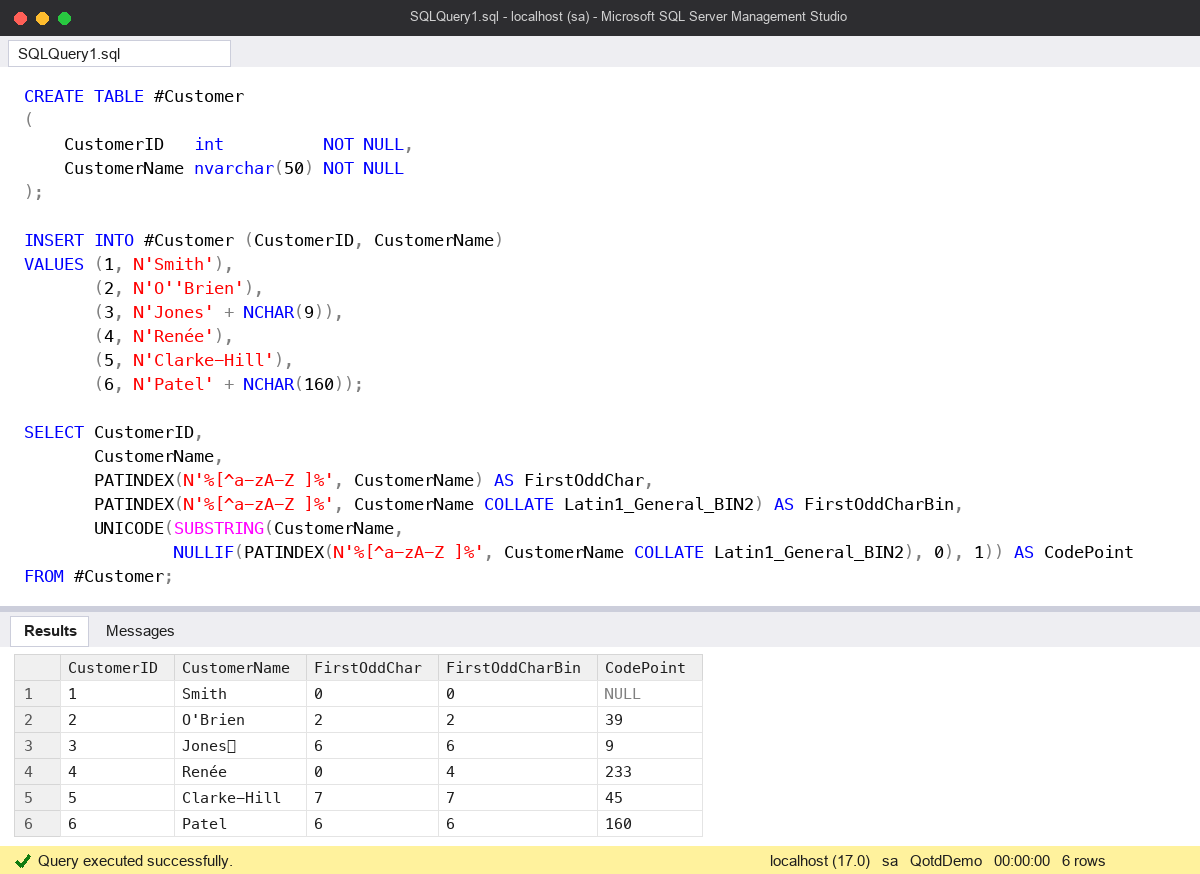
Here’s a small table of surnames with a few of the usual suspects mixed in: an apostrophe, a tab, an accented letter, a hyphen and a non-breaking space (NCHAR(160), which is what you often get from text pasted out of a web page or a Word document).
CREATE TABLE #Customer
(
    CustomerID   int          NOT NULL,
    CustomerName nvarchar(50) NOT NULL
);

INSERT INTO #Customer (CustomerID, CustomerName)
VALUES (1, N'Smith'),
       (2, N'O''Brien'),
       (3, N'Jones' + NCHAR(9)),
       (4, N'Renée'),
       (5, N'Clarke-Hill'),
       (6, N'Patel' + NCHAR(160));

SELECT CustomerID,
       CustomerName,
       PATINDEX(N'%[^a-zA-Z ]%', CustomerName) AS FirstOddChar,
       PATINDEX(N'%[^a-zA-Z ]%', CustomerName COLLATE Latin1_General_BIN2) AS FirstOddCharBin,
       UNICODE(SUBSTRING(CustomerName,
               NULLIF(PATINDEX(N'%[^a-zA-Z ]%', CustomerName COLLATE Latin1_General_BIN2), 0), 1)) AS CodePoint
FROM #Customer;
On a server with the common default collation, SQL_Latin1_General_CP1_CI_AS, the two PATINDEX columns agree for every row except one. Smith returns 0 in both. O’Brien returns 2, Jones returns 6 (the tab), Clarke-Hill returns 7 (the hyphen) and Patel returns 6 (the non-breaking space). But Renée returns 0 in FirstOddChar and 4 in FirstOddCharBin. The CodePoint column tells you exactly what was found: 39, 9, 233, 45 and 160. I find UNICODE() far more useful than eyeballing the text, because tabs and non-breaking spaces look exactly like ordinary spaces in the SSMS grid.
The common mistake: trusting [a-z] under your collation
Most people read [a-z] as “the 26 lower-case letters”. It isn’t. Under a non-binary collation, a range means “every character that sorts between a and z”, and the collation decides the sort order. In a Latin1 dictionary order, é sorts between e and f, so it sits inside [a-z] and the negated class doesn’t flag it. That’s why Renée slipped through above, even though the collation is accent-sensitive.
It gets odder with a case-sensitive collation, where upper and lower case are interleaved (a, A, b, B … z, Z):
SELECT PATINDEX('%[a-z]%', 'A' COLLATE Latin1_General_CS_AS) AS CsUpperA,
       PATINDEX('%[a-z]%', 'Z' COLLATE Latin1_General_CS_AS) AS CsUpperZ,
       PATINDEX('%[a-z]%', 'A' COLLATE Latin1_General_BIN2)  AS BinUpperA;
That returns 1, 0 and 0. Upper-case A is “inside” a to z, upper-case Z isn’t, and under the binary collation neither is. So a check written as [^a-z] to catch capitals would quietly miss most of them.
The fix is simple: when you mean “these exact code points”, say so with a binary collation. COLLATE Latin1_General_BIN2 on the column makes ranges compare by code point, so [a-z] really does mean the 26 ASCII lower-case letters and nothing else. I use BIN2 rather than the older BIN collations; it’s the one Microsoft recommends.
Finding the rows rather than the position
Usually I don’t care where the character is, only which rows have one. The same pattern works in a WHERE clause with LIKE. This one allows letters, spaces, apostrophes and hyphens, because those are fine in surnames, and reports everything else:
SELECT CustomerID, CustomerName
FROM #Customer
WHERE CustomerName COLLATE Latin1_General_BIN2 LIKE N'%[^a-zA-Z ''-]%';
That returns Jones (tab), Renée and Patel (non-breaking space). Note the doubled single quote to put an apostrophe inside the string, and that the hyphen goes last in the class so it’s read as a literal and not as a range. Whether Renée should really be flagged is a business decision, of course; the point is that now it’s your decision and not the collation’s.
Watch out for
- Non-sargable searches. A leading
%plus a COLLATE on the column means a full scan every time. That’s fine for a data-quality check, not for a query that runs a thousand times a minute. - NULLs and empty strings. PATINDEX returns NULL for a NULL string and 0 for an empty one. If you use the result in SUBSTRING, wrap it in NULLIF(…, 0) as above, or you’ll get an empty string back rather than an obvious “nothing found”.
- Brackets in the class.
[[]matches a literal opening bracket, but[]]doesn’t work for a closing one; put]outside a class instead. PATINDEX has no ESCAPE clause, although LIKE does. - varchar vs nvarchar. Use N” patterns against nvarchar columns. A varchar pattern will still run, but anything outside the code page has already been lost before you start looking.
- SQL Server 2025 regex. If you’re on 2025, REGEXP_LIKE and REGEXP_INSTR can do this too, with proper classes such as
\p{L}. I cover them in SQL Server Regex Functions. PATINDEX is still the one that works everywhere.
Stray characters at the end of a value are a close cousin of this problem; see Trailing Spaces in SQL Server. For more day-to-day scripts, the SQL Server DBA Handbook is the place to start. Microsoft’s reference pages for PATINDEX and LIKE cover the full wildcard syntax.
This topic came up in the SQLServerCentral Question of the Day: Detecting Characters.
Clive Roberts DBA