Applies to SQL Server 2019, 2022 and 2025.
The sqlcmd utility is the plain command-line way to run T-SQL against SQL Server. I mostly use it for scripts that run on a schedule: from Windows Task Scheduler, a SQL Agent CmdExec step, a deployment pipeline or a Linux cron job. It’s simple to start with, but a couple of its defaults catch people out, and one of them can hide a failed job for weeks.
What the sqlcmd utility does
sqlcmd connects to an instance, sends batches of T-SQL (split on GO, just like SSMS) and prints the results as text. The switches I use most are:
-Sthe server, e.g.-S SQL01\SALESor-S SQL01,1433-EWindows authentication, or-Uwith a login (keep the password in theSQLCMDPASSWORDenvironment variable rather than on the command line with-P)-dthe database to start in-ian input script file, and-oan output file-Q "query"runs a query and exits;-q "query"runs it and then leaves you at the interactive prompt, which hangs any scheduled job that uses it-v Name=valuesets a scripting variable that the script reads as$(Name)-bexits with an error code when a batch fails (more on that below)
There are two versions in use now: the original ODBC-based sqlcmd that comes with SQL Server and the mssql-tools18 package, and the newer Go-based one (go-sqlcmd). The switches above work in both. Where they differ I say so.
A script to run with the sqlcmd utility
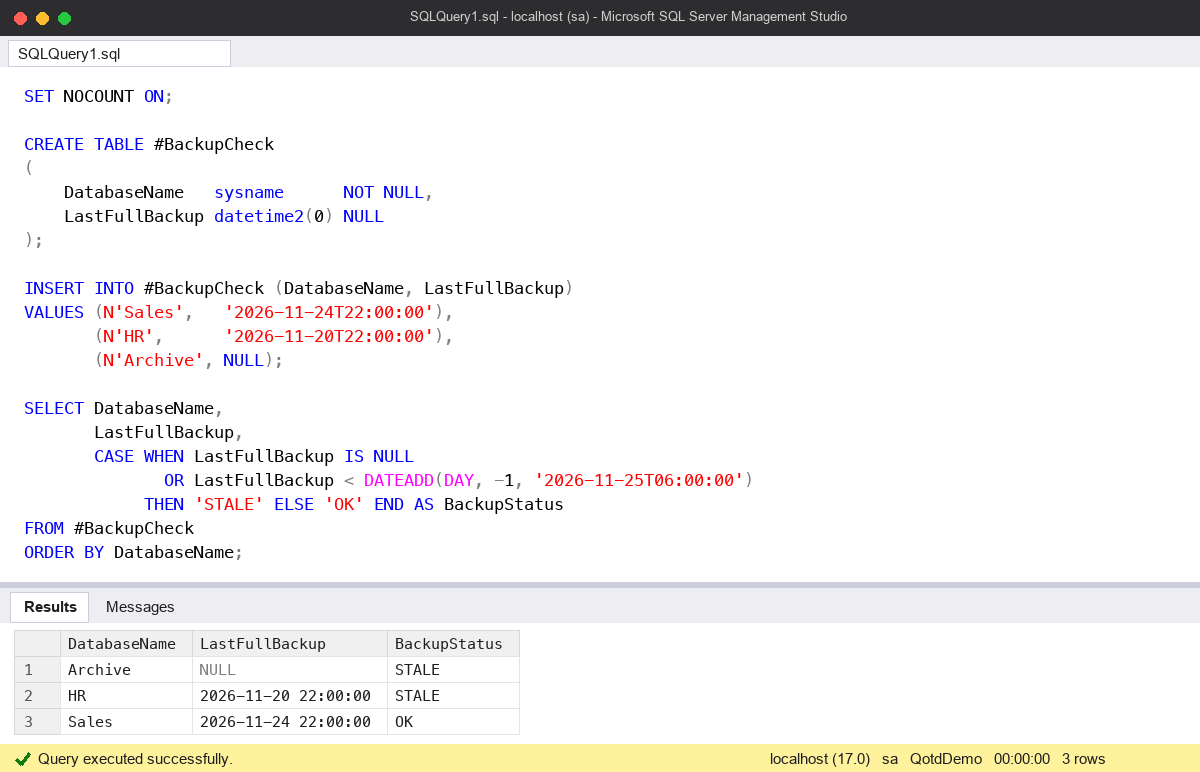
Here’s the sort of check script I schedule. In real life the first part would read msdb.dbo.backupset; I’ve used a temp table so you can paste it into SSMS and see what it returns.
SET NOCOUNT ON;

CREATE TABLE #BackupCheck
(
    DatabaseName   sysname      NOT NULL,
    LastFullBackup datetime2(0) NULL
);

INSERT INTO #BackupCheck (DatabaseName, LastFullBackup)
VALUES (N'Sales',   '2026-11-24T22:00:00'),
       (N'HR',      '2026-11-20T22:00:00'),
       (N'Archive', NULL);

SELECT DatabaseName,
       LastFullBackup,
       CASE WHEN LastFullBackup IS NULL
              OR LastFullBackup < DATEADD(DAY, -1, '2026-11-25T06:00:00')
            THEN 'STALE' ELSE 'OK' END AS BackupStatus
FROM #BackupCheck
ORDER BY DatabaseName;
The end of the script turns a bad result into an error, so whatever runs it can tell something is wrong:
IF EXISTS (SELECT 1
           FROM #BackupCheck
           WHERE LastFullBackup IS NULL
              OR LastFullBackup < DATEADD(DAY, -1, '2026-11-25T06:00:00'))
    THROW 50001, N'One or more databases have no recent full backup.', 1;
Saved as C:\Scripts\BackupCheck.sql, I run it like this:
sqlcmd -S SQL01 -E -d master -b -i C:\Scripts\BackupCheck.sql -o C:\Scripts\Logs\BackupCheck.txt
echo %ERRORLEVEL%
Archive and HR come back STALE, the THROW fires (severity 16), and because of -b sqlcmd exits with ERRORLEVEL 1. Task Scheduler or the Agent step sees a failure, and the error message is in the output file.
The common mistake: leaving out -b
Without -b, sqlcmd prints the error, carries on with the next batch and finishes with exit code 0. As far as Task Scheduler, a SQL Agent CmdExec step or a pipeline is concerned, the script worked. I tested it on SQL Server 2025 with a three-batch script whose middle batch divides by zero. Without -b, batches 1 and 3 both ran and the exit code was 0. With -b, it stopped after the failed batch and returned 1.
People assume a red error message means a failed job. It doesn’t. The job only fails if the process returns a non-zero exit code, and by default sqlcmd doesn’t. That’s how a nightly backup or purge script can fail every night while the job history stays green. Add -b to every scheduled sqlcmd call. If you only want serious errors to count, add -V with a severity level as well (for example -V 16). Inside a script, :ON ERROR EXIT does the same as -b.
Watch out for
- QUOTED_IDENTIFIER is off. The ODBC sqlcmd connects with
SET QUOTED_IDENTIFIER OFFunless you pass-I, while SSMS turns it on. A script that works in SSMS can then fail in sqlcmd with an “incorrect SET options” error when it changes a table with a filtered index, an indexed view or an index on a computed column. Use-I. go-sqlcmd always has it on. - Encryption with ODBC Driver 18. The mssql-tools18 sqlcmd encrypts by default and checks the server’s certificate. Against a server with a self-signed certificate it fails with “certificate verify failed”. The right fix is a proper certificate.
-C(trust the server certificate) gets you connected, but it’s for test boxes, not production. - Undefined variables. If the script uses
$(DbName)and you forget-v DbName=..., the ODBC sqlcmd warns that the variable isn’t defined, runs the batch with the literal text$(DbName)still in it and, without-b, returns 0. With-bit stops and returns 1. - -q in a job. It leaves sqlcmd waiting for input, so the job never finishes. Use
-Qor-i. - Passwords on the command line.
-Pshows up in process lists and job history. Use-E, or setSQLCMDPASSWORD.
For more on scheduling with sqlcmd, see my older note on scheduling SQL Server Express backups with sqlcmd, which needs -b added for exactly this reason, and the rest of the SQL Server DBA Handbook. Microsoft’s full list of switches, including the differences between the two versions, is on the sqlcmd utility page on Microsoft Learn, and the quoted identifier rules are under SET QUOTED_IDENTIFIER.
This topic came up in the SQLServerCentral Question of the Day: Running SQLCMD II.
Clive Roberts DBA