Applies to SQL Server 2019, 2022 and 2025.
SQL Server connection encryption protects the data travelling between an application and the server: the queries, the results and anything else on the wire. It’s separate from TDE or backup encryption, which protect data at rest. I check it on every server I look after, because the default is not what most people assume.
What SQL Server connection encryption covers
Connections to SQL Server use the TDS protocol, and TDS can be wrapped in TLS. Without TLS, only the login packet is encrypted. SQL Server makes a self-signed certificate at startup for that job, so the password isn’t sent in clear text. Everything after the login goes over the network unencrypted unless the client asks for encryption or the server insists on it.
There are three things you can control:
- The client’s Encrypt setting. In the connection string this is
Encrypt=Optional(the oldFalse),Mandatory(the oldTrue) orStrict. Microsoft.Data.SqlClient 4.0 and later and ODBC Driver 18 default to Mandatory. - Force Encryption on the server. This is set in SQL Server Configuration Manager under the instance’s protocol properties. With it on, the server encrypts every connection whether the client asked or not.
- Force Strict Encryption (SQL Server 2022 and later). This makes every client connect with TDS 8.0 and
Encrypt=Strict. TLS is set up before any TDS traffic, TLS 1.3 can be used, and the client always validates the certificate.
Checking SQL Server connection encryption
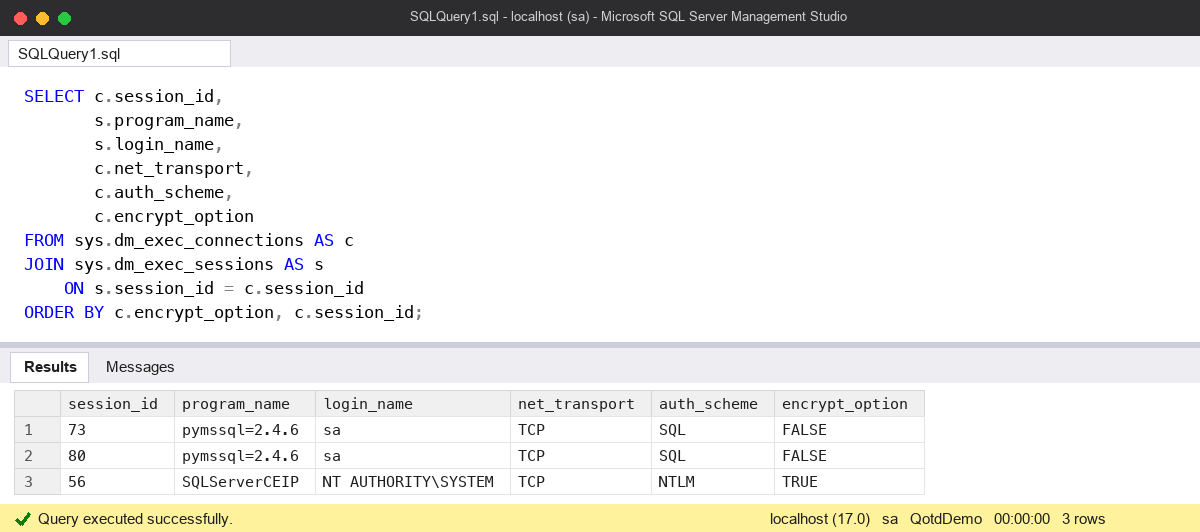
Don’t trust the connection string. Ask the server what it’s actually doing. sys.dm_exec_connections has an encrypt_option column for every current connection:
SELECT c.session_id,
       s.program_name,
       s.login_name,
       c.net_transport,
       c.auth_scheme,
       c.encrypt_option
FROM sys.dm_exec_connections AS c
JOIN sys.dm_exec_sessions AS s
    ON s.session_id = c.session_id
ORDER BY c.encrypt_option, c.session_id;
On my SQL Server 2025 test box, the CEIP telemetry service came back as TRUE, while my own Python connection, using an older driver with default settings, came back as FALSE. That’s typical. Older drivers and tools quietly connect without encryption, and nothing tells you.
For a quick summary across a busy server, group it by application:
SELECT s.program_name,
       c.encrypt_option,
       COUNT(*) AS Connections
FROM sys.dm_exec_connections AS c
JOIN sys.dm_exec_sessions AS s
    ON s.session_id = c.session_id
GROUP BY s.program_name, c.encrypt_option
ORDER BY c.encrypt_option, Connections DESC;
Anything showing FALSE is sending its query text and result sets across the network in the clear.
Turning it on properly
The order I follow:
- Get a proper certificate from your internal CA or a public one. The subject or a SAN entry must match the name clients use to connect (usually the FQDN, plus the listener name for an Availability Group). It needs the Server Authentication EKU, and the SQL Server service account must be able to read its private key.
- Pick it on the Certificate tab in Configuration Manager (on Linux, set
network.tlscertandnetwork.tlskeywith mssql-conf). Restart the service. - Make sure the clients trust the CA. Then switch on Force Encryption, or Force Strict Encryption on 2022 and later once every client driver supports TDS 8.0.
- Run the query above again and check for any FALSE rows.
The common mistake
The mistake I see most often is TrustServerCertificate=True added to every connection string. It usually starts after a driver upgrade. The new driver defaults to Encrypt=Mandatory, the server only has its self-signed certificate, and the application fails with “The certificate chain was issued by an authority that is not trusted”. Someone searches the error, adds TrustServerCertificate=True, and the error goes away.
The connection is now encrypted, and encrypt_option shows TRUE, but the client has stopped checking who it’s talking to. Anything sitting between the client and the server can present its own certificate and read the traffic. You’ve got encryption without authentication, which is a lot weaker than it looks in an audit. It’s fine on a laptop test instance, but it shouldn’t be in production connection strings. The real fix is a trusted certificate on the server.
The other half of the same mistake is thinking Force Encryption on the server fixes it. It doesn’t. The server can insist that traffic is encrypted, but only the client can decide to validate the certificate. With Force Strict Encryption, TrustServerCertificate is ignored and the certificate is always checked, which is one of the best reasons to move to it.
Watch out for
- Name mismatches. Connecting by IP address or a short alias won’t match a certificate issued for the FQDN, and validation fails.
- Old clients and Strict. Force Strict Encryption locks out drivers that don’t speak TDS 8.0. Check versions first, including SSIS, linked servers and third-party tools.
- Certificate expiry. When the TLS certificate expires, validating clients can’t connect. Track it like any other server certificate, as I describe in SQL Server Certificate Expiry.
- sqlcmd and bcp. The ODBC 18 versions encrypt by default, and
-Cis their TrustServerCertificate switch. See Running Scripts with the sqlcmd Utility. - Restarts. Certificate and Force Encryption changes only take effect after the SQL Server service restarts, so plan a window.
Microsoft’s guide is Configure SQL Server Database Engine for encrypting connections, and the TDS 8.0 details are in TDS 8.0. For encryption at rest, see my Encryption overview, and the rest of my notes are in the SQL Server DBA Handbook.
This topic came up in the SQLServerCentral Question of the Day: Secure Communications.
Clive Roberts DBA